How to Choose an Ergonomic Office Chair: A Practical Guide

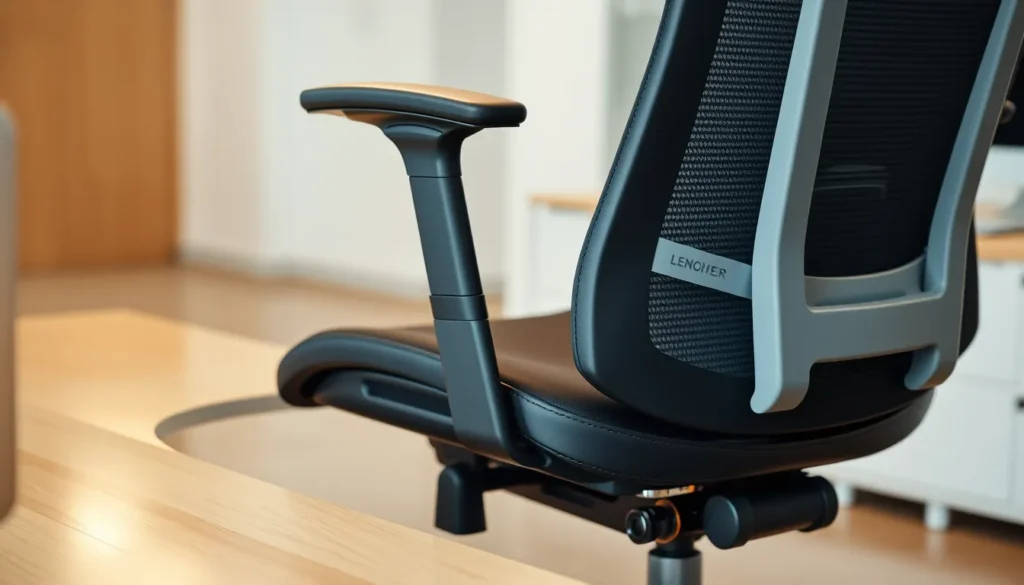
Choosing an ergonomic office chair can feel overwhelming, but it doesn’t have to be. If you spend long hours at a desk, this guide shows you how to pick a chair that keeps you comfortable and healthy.
We’ll walk through the key measurements and adjustments that make a chair truly supportive—seat height, depth, lumbar support, backrest tilt, armrest position, and more—so you can match the chair to your body and work style.
By the end, you’ll know exactly what to look for during hands‑on testing, how to evaluate build quality, and how to make a confident purchase that protects your posture for years.
Understanding Core Ergonomic Principles for Seating
Good posture is more than just looking straight. It keeps the spine’s natural curves—cervical, thoracic, lumbar—aligned so that muscles, ligaments, and discs share the load evenly. When the spine is off‑balance, certain segments bear excess pressure, leading to fatigue, stiffness, and, over time, pain or injury.
Pressure distribution is a key indicator of a chair’s support. A well‑designed seat places weight on the hips and thighs rather than the lower back or hips, reducing strain on the lumbar discs and allowing the pelvis to stay in a neutral position.
Movement is essential. A chair that encourages subtle shifts—tilting, rocking, or rotating—lets the body change posture throughout the day. Static sitting for long periods can cause circulation problems and muscle tightness. By integrating small, controlled motions, an ergonomic chair helps maintain circulation and keeps muscles active.
When shoulders are hunched or hips are tipped forward, the thoracic spine flexes and the lumbar region compensates, creating a cascade of strain that can irritate nerves traveling through the spine, producing tingling or numbness in the arms or legs.
Lumbar support mimics the natural inward curve of the lower back. By keeping the lumbar region in its natural shape, the chair reduces the need for muscles to overwork, lowering the risk of chronic lower‑back pain.
Finally, the ability to move—whether by rotating the seat, shifting weight, or adjusting tilt—keeps the circulatory system active, reduces swelling in the legs, and prevents the stiffness that accompanies prolonged static postures.
Essential Adjustable Features and How They Work
Seat Height and Depth
Start by adjusting the seat height so your feet rest flat on the floor or a footrest, with knees bent at roughly ninety degrees. This prevents pressure under the thighs and keeps your hips slightly lower than your shoulders. Next, check the seat depth. There should be a small gap between the back edge of the seat and the back of your knees. If the seat is too deep, it presses against your legs, restricting circulation; too shallow, and your thighs lack support. Most chairs offer a slider to fine-tune this dimension.
Lumbar Support and Backrest Tilt
Proper lumbar support maintains the natural inward curve of your lower spine. Adjust the support so it contacts your lower back without forcing your upper back away from the chair. Pair this with backrest tilt, which allows you to lean back comfortably. Set the tilt tension to match your weight so the chair doesn’t tip forward or backward unexpectedly. A synchronized tilt mechanism often links the backrest and seat to maintain proper alignment as you move.
Armrest Positioning
Set the armrest height so your elbows rest at a ninety-degree angle while typing. This reduces strain on your neck and shoulders. If the armrests offer height, depth, and width adjustments, customize them to keep your forearms parallel to the floor. Incorrect armrest positioning often forces users to hunch their shoulders or twist their wrists, leading to upper body fatigue. Ensure the armrests do not impede sitting close to your desk.
Matching Chair Design to Your Body and Work Style
Measure Your Dimensions First
Before browsing, gather three key measurements. Sit on a firm surface with your feet flat. Measure from the seat surface to the top of your chest or shoulder line; this indicates your required backrest height. Next, measure from the back of your thigh to the crease behind your knee. This determines your ideal seat depth. Finally, weigh yourself to confirm your fit against the chair’s weight capacity. Exceeding this limit can damage the gas lift and frame prematurely.
Consider Your Primary Tasks
Your daily activities dictate which features matter most. If you spend eight hours typing, prioritize precise armrest height and seat height adjustments to maintain neutral wrist positions. For drafting or standing desk users, a chair with a quick-release seat height lever and a firm backrest tilt mechanism allows for rapid transitions between sitting and standing. If your role involves frequent meetings or collaborative work, look for a swivel base that rotates smoothly without resistance. This facilitates easy conversation and movement without twisting your torso.
Match the Upholstery to Your Environment
Material choice impacts comfort and durability. Mesh upholstery provides superior airflow, making it ideal for users who tend to overheat or work in warmer climates. It also offers more flexibility to the back, accommodating dynamic movements. Leather or fabric options retain heat but may offer a softer initial feel. Consider your climate and personal sweat levels when deciding. A well-ventilated seat helps maintain consistent comfort throughout long work sessions, reducing the urge to shift position frequently.
Final Fit Check
Combine these personal metrics with your specific work style. A chair that fits a tall, active drafter differently than one for a shorter, sedentary data entry clerk. Align the chair’s adjustability range with your measured dimensions and task requirements to ensure long-term support and productivity.
Assessing Build Quality and Materials
- Frame Material: Plastic frames are lightweight but may crack under pressure. Metal frames, particularly aluminum or steel, offer superior longevity and support for heavier users. Check welds for smoothness and strength.
- Base Stability: The five-star base distributes weight evenly. Ensure the gas lift cylinder is certified for safety and the base does not wobble when pushed. A solid, wide footprint prevents tipping during dynamic movements.
- Wheel Type: Hard casters suit hard floors like concrete or tile, while soft rubber or polyurethane wheels protect carpeted surfaces. Match the wheel material to your office flooring to avoid damage and ensure smooth rolling.
- Upholstery Choices: Mesh upholstery provides breathability, ideal for warm environments, and resists sagging over time. Fabric or leather offers a softer feel but may require more maintenance. Inspect stitching for tightness and uniformity; loose threads indicate poor construction.
- Durability Indicators: Examine the mechanisms. Tilt locks should engage firmly without slipping. Armrests must move smoothly and lock securely. If any part feels loose, rattly, or stiff out of the box, it will likely deteriorate further with use. A well-built chair maintains tension and alignment after years of daily adjustment, ensuring consistent ergonomic support and structural integrity.
Practical Testing and Buying Strategies
When you’re ready to buy, the real test begins in the showroom. Sit on each model for at least ten minutes, moving through the full range of adjustments. Pay attention to how the chair feels when you lean back, twist, and reach. A chair that feels natural after a short session is more likely to support you long term.
Many retailers offer a trial period, often 30 to 90 days, that lets you test the chair in your own workspace. During this time, note any stiffness, wobble, or discomfort that appears after a few hours. If the chair feels better after a short adjustment period, that’s a good sign of quality construction.
Check the warranty length and coverage. A solid chair usually comes with a minimum five‑year guarantee on major components. Verify whether the warranty includes replacement parts, labor, and whether it covers normal wear rather than accidental damage. A comprehensive warranty reduces long‑term risk and signals a manufacturer’s confidence in its product.
Create a simple comparison sheet that lists key specs: seat height range, seat depth, lumbar adjustment, backrest tilt, armrest motion, weight capacity, and upholstery type. Rate each model on a consistent scale, such as 1 to 5, to see which balances comfort, durability, and price. Let the data, not the slogan, guide your final choice.
